


Description
Download Atlas VPN – Free, Secure, Unlimited VPN for Windows, Mac, Android & iOS
Overview – Why Atlas VPN Stands Out in the Free VPN Landscape
Atlas VPN entered the market as a fresh alternative to the crowded VPN space, positioning itself as a truly free solution that does not compromise on core security fundamentals. Built in the United States and backed by a team of networking veterans, Atlas VPN offers a blend of strong encryption, a built‑in kill switch, and a no‑logs policy that rivals many paid competitors. The service currently provides more than 700 servers spread across 28 countries, giving users a respectable geographic reach while keeping latency at manageable levels for everyday browsing. Even though the free tier restricts server selection to two countries, it still grants unlimited data, a rare feature among free VPNs that usually impose strict caps. Atlas VPN also employs the IKEv2 tunneling protocol, known for its speed and resilience on mobile networks, and leverages AES‑256 encryption – the same standard used by military and financial institutions. The inclusion of an always‑on VPN option further enhances protection against accidental data leaks. While premium users gain access to a broader server pool, optimized streaming servers, and faster speeds, the free version remains a solid privacy shield for casual users, travelers, and anyone looking to bypass basic geo‑restrictions without paying a dime. In short, Atlas VPN’s combination of unlimited data, strong encryption, and a zero‑ads experience makes it a noteworthy contender for anyone seeking a reliable, cost‑free privacy tool.
Key Features, Pros and Cons – What You Get with Atlas VPN
Core Feature Set
- Unlimited data on the free plan – no monthly caps.
- AES‑256 encryption ensuring military‑grade security.
- IKEv2 tunneling protocol for fast, stable connections on mobile networks.
- Built‑in kill switch that activates automatically if the VPN drops.
- Zero‑ads experience – the interface is clean and distraction‑free.
- No‑logs policy guaranteeing that browsing activity is never stored.
- Always‑on VPN option for continuous protection on Android and iOS.
- Access to 700+ servers in 28 countries for the paid tier.
- Simple one‑tap connect UI suitable for beginners.
- Support for Windows 10/11, macOS 10.15+, Android 6.0+, and iOS 13+.
Pros
- Unlimited bandwidth on a truly free tier.
- Strong encryption and a reliable kill switch included at no cost.
- Zero‑ads, clean user interface that’s easy to navigate.
- No‑logs guarantee offers peace of mind for privacy‑concerned users.
- Cross‑platform support means you can protect all your devices with a single account.
Cons
- Free users are limited to servers in only two countries, restricting geo‑unblocking options.
- Speed on the free tier can be slower compared to premium competitors, especially during peak times.
- Advanced features such as SOCKS5 proxy, port forwarding, or dedicated P2P servers are missing.
- Streaming optimization is reserved for premium users; free users may encounter buffering on services like Netflix.
- Customer support is limited for free accounts, with priority given to paying subscribers.
Step‑by‑Step Installation & First‑Time Usage Guide
Installing Atlas VPN is straightforward across all major operating systems. Begin by visiting the official Atlas VPN website or the relevant app store for your device. For Windows and macOS, download the desktop installer; for Android and iOS, locate “Atlas VPN” in Google Play Store or Apple App Store. Once the installer is downloaded, run it and follow the on‑screen prompts: accept the license agreement, choose the installation folder (default is recommended), and click “Install.” After installation, launch the application and create a new account using an email address or a social login. The free tier does not require a payment method, so you can skip any billing steps.
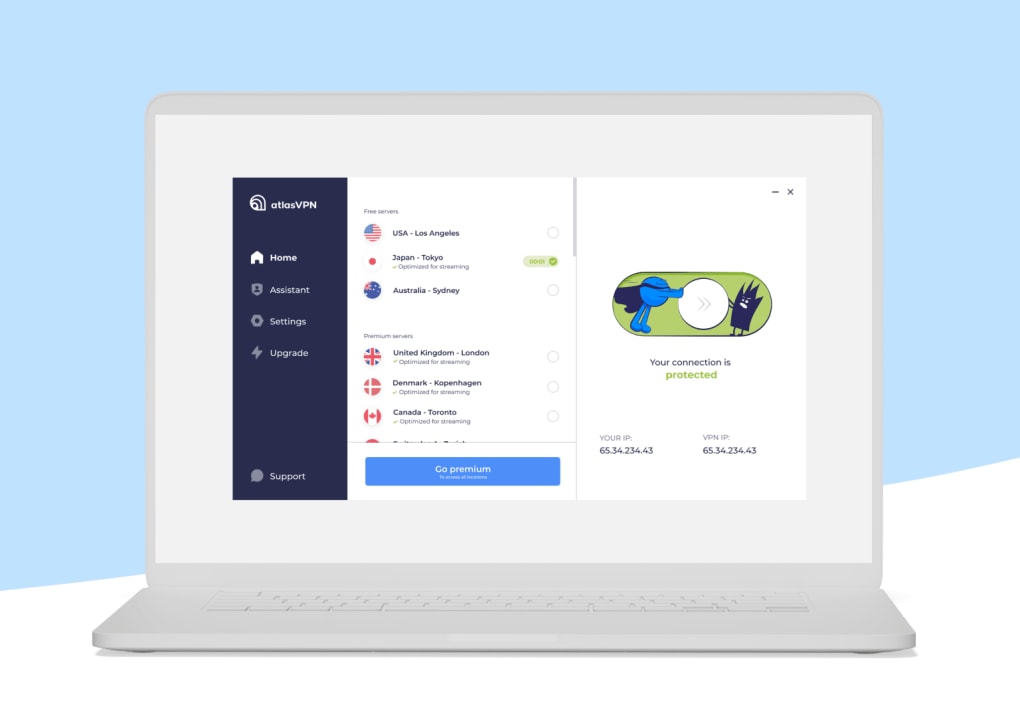
Upon first launch, you’ll be greeted with a clean dashboard displaying a large “Connect” button and a quick toggle for the kill switch. Before connecting, navigate to the settings menu to enable “Always‑on VPN” if you want the protection to start automatically whenever your device connects to the internet. You can also select the preferred protocol (IKEv2 is pre‑selected for optimal speed). For free users, choose one of the two available server locations – typically a US or a European node – and click “Connect.” The app will establish a secure tunnel within seconds, indicated by a green shield icon.
Once connected, you can browse, stream, or use public Wi‑Fi with confidence. To verify that your IP address is masked, visit a site such as whatismyipaddress.com – you should see the IP of the Atlas VPN server rather than your real location. If you need to switch servers, simply open the server list, pick a new location (premium users will see a broader selection), and reconnect. The kill switch will automatically cut internet traffic if the VPN drops, ensuring no data leaks. Finally, remember to log out of the app when you’re done, especially on shared devices, to keep your credentials secure.
Compatibility, Supported Platforms and Frequently Asked Questions
Atlas VPN supports a wide range of operating systems, making it a versatile choice for households with mixed devices. Officially, the application runs on:
- Windows 10 and Windows 11 (64‑bit)
- macOS Catalina (10.15) and later
- Android 6.0 (Marshmallow) and newer
- iOS 13 and newer (iPadOS included)
Is Atlas VPN truly free, or are there hidden charges?
Yes, Atlas VPN offers a genuinely free tier with unlimited data and no hidden fees. You only need to pay if you upgrade to the premium plan for additional servers and streaming optimization.
Does the free version keep logs of my activity?
No. Atlas VPN follows a strict no‑logs policy for both free and premium users. Your browsing history, connection timestamps, and IP addresses are never stored on their servers.
Can I use Atlas VPN to stream Netflix or Hulu?
Streaming optimization is available only to premium subscribers. Free users may experience buffering or may be unable to access certain libraries because the free servers are not flagged as “streaming‑friendly.”
Is the kill switch available on mobile devices?
Yes. The kill switch is built into the Android and iOS apps and activates automatically if the VPN connection drops, protecting your data from accidental exposure.
What encryption standard does Atlas VPN use?
Atlas VPN employs AES‑256 encryption, the same level used by banks and governments, ensuring that all traffic between your device and the VPN server is highly secure.
Conclusion – Is Atlas VPN the Right Choice for You?
Atlas VPN delivers a compelling package for users who need a reliable privacy layer without paying a subscription fee. Its unlimited data allowance, AES‑256 encryption, and automatic kill switch put it ahead of many free competitors that impose strict bandwidth caps or display intrusive ads. The cross‑platform support means you can protect laptops, smartphones, and tablets with a single account, and the clean UI makes it accessible even for VPN newcomers.
However, the free tier’s server limitation to only two countries and the slower speeds during peak usage may be a deal‑breaker for power users, streamers, or gamers who demand high‑performance connections. Premium upgrades unlock a broader server network, streaming‑optimized nodes, and faster speeds, but they still lag behind market leaders such as NordVPN or CyberGhost in sheer server count and advanced features like SOCKS5 proxy.
In summary, if you’re looking for a straightforward, no‑ads VPN that safeguards your browsing on a budget, Atlas VPN is a solid pick. For heavy‑duty tasks—like consistent 4K streaming, large‑file P2P sharing, or ultra‑low latency gaming—consider a premium service with a larger infrastructure. Either way, trying Atlas VPN’s free version is risk‑free, making it an excellent entry point into the world of online privacy.
Atlas VPN delivers solid security with unlimited data on a free tier, making it a strong contender for casual users. The kill‑switch and AES‑256 encryption are standout features, though the limited server selection on the free plan and slower speeds compared with premium rivals keep it from being a top‑tier solution.
Guides & Tutorials for Atlas VPN
How to install Atlas VPN
- Click the Preview / Download button above.
- Once redirected, accept the terms and click Install.
- Wait for the Atlas VPN download to finish on your device.
How to use Atlas VPN
This software is primarily used for its core features described above. Open the app after installation to explore its capabilities.
User Reviews for Atlas VPN 0
No reviews found





.webp)